menu


Tuesday, 17 March 2020

PHP - Regular Expressions

Regular expressions are nothing more than a sequence or pattern of characters itself. They provide the foundation for pattern-matching functionality.
Using regular expression you can search a particular string inside a another string, you can replace one string by another string and you can split a string into many chunks.
PHP offers functions specific to two sets of regular expression functions, each corresponding to a certain type of regular expression. You can use any of them based on your comfort.
  • POSIX Regular Expressions
  • PERL Style Regular Expressions

POSIX Regular Expressions

The structure of a POSIX regular expression is not dissimilar to that of a typical arithmetic expression: various elements (operators) are combined to form more complex expressions.
The simplest regular expression is one that matches a single character, such as g, inside strings such as g, haggle, or bag.
Lets give explanation for few concepts being used in POSIX regular expression. After that we will introduce you with regular expression related functions.

Brackets

Brackets ([]) have a special meaning when used in the context of regular expressions. They are used to find a range of characters.
Sr.NoExpression & Description
1
[0-9]
It matches any decimal digit from 0 through 9.
2
[a-z]
It matches any character from lower-case a through lowercase z.
3
[A-Z]
It matches any character from uppercase A through uppercase Z.
4
[a-Z]
It matches any character from lowercase a through uppercase Z.
The ranges shown above are general; you could also use the range [0-3] to match any decimal digit ranging from 0 through 3, or the range [b-v] to match any lowercase character ranging from b through v.

Quantifiers

The frequency or position of bracketed character sequences and single characters can be denoted by a special character. Each special character having a specific connotation. The +, *, ?, {int. range}, and $ flags all follow a character sequence.
Sr.NoExpression & Description
1
p+
It matches any string containing at least one p.
2
p*
It matches any string containing zero or more p's.
3
p?
It matches any string containing zero or one p's.
4
p{N}
It matches any string containing a sequence of N p's
5
p{2,3}
It matches any string containing a sequence of two or three p's.
6
p{2, }
It matches any string containing a sequence of at least two p's.
7
p$
It matches any string with p at the end of it.
8
^p
It matches any string with p at the beginning of it.

Examples

Following examples will clear your concepts about matching characters.
Sr.NoExpression & Description
1
[^a-zA-Z]
It matches any string not containing any of the characters ranging from a through z and A through Z.
2
p.p
It matches any string containing p, followed by any character, in turn followed by another p.
3
^.{2}$
It matches any string containing exactly two characters.
4
<b>(.*)</b>
It matches any string enclosed within <b> and </b>.
5
p(hp)*
It matches any string containing a p followed by zero or more instances of the sequence php.

Predefined Character Ranges

For your programming convenience several predefined character ranges, also known as character classes, are available. Character classes specify an entire range of characters, for example, the alphabet or an integer set −
Sr.NoExpression & Description
1
[[:alpha:]]
It matches any string containing alphabetic characters aA through zZ.
2
[[:digit:]]
It matches any string containing numerical digits 0 through 9.
3
[[:alnum:]]
It matches any string containing alphanumeric characters aA through zZ and 0 through 9.
4
[[:space:]]
It matches any string containing a space.

PHP's Regexp POSIX Functions

PHP currently offers seven functions for searching strings using POSIX-style regular expressions −
Sr.NoFunction & Description
1ereg()
The ereg() function searches a string specified by string for a string specified by pattern, returning true if the pattern is found, and false otherwise.
2ereg_replace()
The ereg_replace() function searches for string specified by pattern and replaces pattern with replacement if found.
3eregi()
The eregi() function searches throughout a string specified by pattern for a string specified by string. The search is not case sensitive.
4eregi_replace()
The eregi_replace() function operates exactly like ereg_replace(), except that the search for pattern in string is not case sensitive.
5split()
The split() function will divide a string into various elements, the boundaries of each element based on the occurrence of pattern in string.
6spliti()
The spliti() function operates exactly in the same manner as its sibling split(), except that it is not case sensitive.
7sql_regcase()
The sql_regcase() function can be thought of as a utility function, converting each character in the input parameter string into a bracketed expression containing two characters.

PERL Style Regular Expressions

Perl-style regular expressions are similar to their POSIX counterparts. The POSIX syntax can be used almost interchangeably with the Perl-style regular expression functions. In fact, you can use any of the quantifiers introduced in the previous POSIX section.
Lets give explanation for few concepts being used in PERL regular expressions. After that we will introduce you wih regular expression related functions.

Meta characters

A meta character is simply an alphabetical character preceded by a backslash that acts to give the combination a special meaning.
For instance, you can search for large money sums using the '\d' meta character: /([\d]+)000/, Here \d will search for any string of numerical character.
Following is the list of meta characters which can be used in PERL Style Regular Expressions.
Character  Description
.              a single character
\s             a whitespace character (space, tab, newline)
\S             non-whitespace character
\d             a digit (0-9)
\D             a non-digit
\w             a word character (a-z, A-Z, 0-9, _)
\W             a non-word character
[aeiou]        matches a single character in the given set
[^aeiou]       matches a single character outside the given set
(foo|bar|baz)  matches any of the alternatives specified

Modifiers

Several modifiers are available that can make your work with regexps much easier, like case sensitivity, searching in multiple lines etc.
Modifier Description
i  Makes the match case insensitive
m  Specifies that if the string has newline or carriage
 return characters, the ^ and $ operators will now
 match against a newline boundary, instead of a
 string boundary
o  Evaluates the expression only once
s  Allows use of . to match a newline character
x  Allows you to use white space in the expression for clarity
g  Globally finds all matches
cg  Allows a search to continue even after a global match fails

PHP's Regexp PERL Compatible Functions

PHP offers following functions for searching strings using Perl-compatible regular expressions −
Sr.NoFunction & Description
1preg_match()
The preg_match() function searches string for pattern, returning true if pattern exists, and false otherwise.
2preg_match_all()
The preg_match_all() function matches all occurrences of pattern in string.
3preg_replace()
The preg_replace() function operates just like ereg_replace(), except that regular expressions can be used in the pattern and replacement input parameters.
4preg_split()
The preg_split() function operates exactly like split(), except that regular expressions are accepted as input parameters for pattern.
5preg_grep()
The preg_grep() function searches all elements of input_array, returning all elements matching the regexp pattern.
6preg_ quote()
Quote regular expression characters

PHP - Predefined Variables

PHP provides a large number of predefined variables to any script which it runs. PHP provides an additional set of predefined arrays containing variables from the web server the environment, and user input. These new arrays are called superglobals −
All the following variables are automatically available in every scope.

PHP Superglobals

Sr.NoVariable & Description
1
$GLOBALS
Contains a reference to every variable which is currently available within the global scope of the script. The keys of this array are the names of the global variables.
2
$_SERVER
This is an array containing information such as headers, paths, and script locations. The entries in this array are created by the web server. There is no guarantee that every web server will provide any of these. See next section for a complete list of all the SERVER variables.
3
$_GET
An associative array of variables passed to the current script via the HTTP GET method.
4
$_POST
An associative array of variables passed to the current script via the HTTP POST method.
5
$_FILES
An associative array of items uploaded to the current script via the HTTP POST method.
6
$_REQUEST
An associative array consisting of the contents of $_GET, $_POST, and $_COOKIE.
7
$_COOKIE
An associative array of variables passed to the current script via HTTP cookies.
8
$_SESSION
An associative array containing session variables available to the current script.
9
$_PHP_SELF
A string containing PHP script file name in which it is called.
10
$php_errormsg
$php_errormsg is a variable containing the text of the last error message generated by PHP.

Server variables: $_SERVER

$_SERVER is an array containing information such as headers, paths, and script locations. The entries in this array are created by the web server. There is no guarantee that every web server will provide any of these.
Sr.NoVariable & Description
1
$_SERVER['PHP_SELF']
The filename of the currently executing script, relative to the document root
2
$_SERVER['argv']
Array of arguments passed to the script. When the script is run on the command line, this gives C-style access to the command line parameters. When called via the GET method, this will contain the query string.
3
$_SERVER['argc']
Contains the number of command line parameters passed to the script if run on the command line.
4
$_SERVER['GATEWAY_INTERFACE']
What revision of the CGI specification the server is using; i.e. 'CGI/1.1'.
5
$_SERVER['SERVER_ADDR']
The IP address of the server under which the current script is executing.
6
$_SERVER['SERVER_NAME']
The name of the server host under which the current script is executing. If the script is running on a virtual host, this will be the value defined for that virtual host.
7
$_SERVER['SERVER_SOFTWARE']
Server identification string, given in the headers when responding to requests.
8
$_SERVER['SERVER_PROTOCOL']
Name and revision of the information protocol via which the page was requested; i.e. 'HTTP/1.0';
9
$_SERVER['REQUEST_METHOD']
Which request method was used to access the page; i.e. 'GET', 'HEAD', 'POST', 'PUT'.
10
$_SERVER['REQUEST_TIME']
The timestamp of the start of the request. Available since PHP 5.1.0.
11
$_SERVER['QUERY_STRING']
The query string, if any, via which the page was accessed.
12
$_SERVER['DOCUMENT_ROOT']
The document root directory under which the current script is executing, as defined in the server's configuration file.
13
$_SERVER['HTTP_ACCEPT']
Contents of the Accept: header from the current request, if there is one.
14
$_SERVER['HTTP_ACCEPT_CHARSET']
Contents of the Accept-Charset: header from the current request, if there is one. Example: 'iso-8859-1,*,utf-8'.
15
$_SERVER['HTTP_ACCEPT_ENCODING']
Contents of the Accept-Encoding: header from the current request, if there is one. Example: 'gzip'.
16
$_SERVER['HTTP_ACCEPT_LANGUAGE']
Contents of the Accept-Language: header from the current request, if there is one. Example: 'en'.
17
$_SERVER['HTTP_CONNECTION']
Contents of the Connection: header from the current request, if there is one. Example: 'Keep-Alive'.
18
$_SERVER['HTTP_HOST']
Contents of the Host: header from the current request, if there is one.
19
$_SERVER['HTTP_REFERER']
The address of the page (if any) which referred the user agent to the current page.
20
$_SERVER['HTTP_USER_AGENT']
This is a string denoting the user agent being which is accessing the page. A typical example is: Mozilla/4.5 [en] (X11; U; Linux 2.2.9 i586).
21
$_SERVER['HTTPS']
Set to a non-empty value if the script was queried through the HTTPS protocol.
22
$_SERVER['REMOTE_ADDR']
The IP address from which the user is viewing the current page.
23
$_SERVER['REMOTE_HOST']
The Host name from which the user is viewing the current page. The reverse dns lookup is based off the REMOTE_ADDR of the user.
24
$_SERVER['REMOTE_PORT']
The port being used on the user's machine to communicate with the web server.
25
$_SERVER['SCRIPT_FILENAME']
The absolute pathname of the currently executing script.
26
$_SERVER['SERVER_ADMIN']
The value given to the SERVER_ADMIN (for Apache) directive in the web server configuration file.
27
$_SERVER['SERVER_PORT']
The port on the server machine being used by the web server for communication. For default setups, this will be '80'.
28
$_SERVER['SERVER_SIGNATURE']
String containing the server version and virtual host name which are added to server-generated pages, if enabled.
29
$_SERVER['PATH_TRANSLATED']
Filesystem based path to the current script.
30
$_SERVER['SCRIPT_NAME']
Contains the current script's path. This is useful for pages which need to point to themselves.
31
$_SERVER['REQUEST_URI']
The URI which was given in order to access this page; for instance, '/index.html'.
32
$_SERVER['PHP_AUTH_DIGEST']
When running under Apache as module doing Digest HTTP authentication this variable is set to the 'Authorization' header sent by the client.
33
$_SERVER['PHP_AUTH_USER']
When running under Apache or IIS (ISAPI on PHP 5) as module doing HTTP authentication this variable is set to the username provided by the user.
34
$_SERVER['PHP_AUTH_PW']
When running under Apache or IIS (ISAPI on PHP 5) as module doing HTTP authentication this variable is set to the password provided by the user.
35
$_SERVER['AUTH_TYPE']
When running under Apache as module doing HTTP authenticated this variable is set to the authentication type.

PHP - Coding Standard

Every company follows a different coding standard based on their best practices. Coding standard is required because there may be many developers working on different modules so if they will start inventing their own standards then source will become very un-manageable and it will become difficult to maintain that source code in future.
Here are several reasons why to use coding specifications −
  • Your peer programmers have to understand the code you produce. A coding standard acts as the blueprint for all the team to decipher the code.
  • Simplicity and clarity achieved by consistent coding saves you from common mistakes.
  • If you revise your code after some time then it becomes easy to understand that code.
  • Its industry standard to follow a particular standard to being more quality in software.
There are few guidelines which can be followed while coding in PHP.
  • Indenting and Line Length − Use an indent of 4 spaces and don't use any tab because different computers use different setting for tab. It is recommended to keep lines at approximately 75-85 characters long for better code readability.
  • Control Structures − These include if, for, while, switch, etc. Control statements should have one space between the control keyword and opening parenthesis, to distinguish them from function calls. You are strongly encouraged to always use curly braces even in situations where they are technically optional.
Examples
if ((condition1) || (condition2)) {
   action1;
}elseif ((condition3) && (condition4)) {
   action2;
}else {
   default action;
}
You can write switch statements as follows −
switch (condition) {
   case 1:
      action1;
      break;
   
   case 2:
      action2;
      break;
         
   default:
      defaultaction;
      break;
}
  • Function Calls − Functions should be called with no spaces between the function name, the opening parenthesis, and the first parameter; spaces between commas and each parameter, and no space between the last parameter, the closing parenthesis, and the semicolon. Here's an example −
$var = foo($bar, $baz, $quux);
  • Function Definitions − Function declarations follow the "BSD/Allman style" −
function fooFunction($arg1, $arg2 = '') {
   if (condition) {
      statement;
   }
   return $val;
}
  • Comments − C style comments (/* */) and standard C++ comments (//) are both fine. Use of Perl/shell style comments (#) is discouraged.
  • PHP Code Tags − Always use <?php ?> to delimit PHP code, not the <? ?> shorthand. This is required for PHP compliance and is also the most portable way to include PHP code on differing operating systems and setups.
  • Variable Names −
    • Use all lower case letters
    • Use '_' as the word separator.
    • Global variables should be prepended with a 'g'.
    • Global constants should be all caps with '_' separators.
    • Static variables may be prepended with 's'.
  • Make Functions Reentrant − Functions should not keep static variables that prevent a function from being reentrant.
  • Alignment of Declaration Blocks − Block of declarations should be aligned.
  • One Statement Per Line − There should be only one statement per line unless the statements are very closely related.
  • Short Methods or Functions − Methods should limit themselves to a single page of code.
There could be many more points which should be considered while writing your PHP program. Over all intention should be to be consistent throughout of the code programming and it will be possible only when you will follow any coding standard. You can device your own standard if you like something different.

PHP - File Uploading

A PHP script can be used with a HTML form to allow users to upload files to the server. Initially files are uploaded into a temporary directory and then relocated to a target destination by a PHP script.
Information in the phpinfo.php page describes the temporary directory that is used for file uploads as upload_tmp_dir and the maximum permitted size of files that can be uploaded is stated as upload_max_filesize. These parameters are set into PHP configuration file php.ini
The process of uploading a file follows these steps −
  • The user opens the page containing a HTML form featuring a text files, a browse button and a submit button.
  • The user clicks the browse button and selects a file to upload from the local PC.
  • The full path to the selected file appears in the text filed then the user clicks the submit button.
  • The selected file is sent to the temporary directory on the server.
  • The PHP script that was specified as the form handler in the form's action attribute checks that the file has arrived and then copies the file into an intended directory.
  • The PHP script confirms the success to the user.
As usual when writing files it is necessary for both temporary and final locations to have permissions set that enable file writing. If either is set to be read-only then process will fail.
An uploaded file could be a text file or image file or any document.

Creating an upload form

The following HTM code below creates an uploader form. This form is having method attribute set to post and enctype attribute is set to multipart/form-data
<?php
   if(isset($_FILES['image'])){
      $errors= array();
      $file_name = $_FILES['image']['name'];
      $file_size =$_FILES['image']['size'];
      $file_tmp =$_FILES['image']['tmp_name'];
      $file_type=$_FILES['image']['type'];
      $file_ext=strtolower(end(explode('.',$_FILES['image']['name'])));
      
      $extensions= array("jpeg","jpg","png");
      
      if(in_array($file_ext,$extensions)=== false){
         $errors[]="extension not allowed, please choose a JPEG or PNG file.";
      }
      
      if($file_size > 2097152){
         $errors[]='File size must be excately 2 MB';
      }
      
      if(empty($errors)==true){
         move_uploaded_file($file_tmp,"images/".$file_name);
         echo "Success";
      }else{
         print_r($errors);
      }
   }
?>
<html>
   <body>
      
      <form action="" method="POST" enctype="multipart/form-data">
         <input type="file" name="image" />
         <input type="submit"/>
      </form>
      
   </body>
</html>
It will produce the following result −
Upload Form

Creating an upload script

There is one global PHP variable called $_FILES. This variable is an associate double dimension array and keeps all the information related to uploaded file. So if the value assigned to the input's name attribute in uploading form was file, then PHP would create following five variables −
  • $_FILES['file']['tmp_name'] − the uploaded file in the temporary directory on the web server.
  • $_FILES['file']['name'] − the actual name of the uploaded file.
  • $_FILES['file']['size'] − the size in bytes of the uploaded file.
  • $_FILES['file']['type'] − the MIME type of the uploaded file.
  • $_FILES['file']['error'] − the error code associated with this file upload.

Example

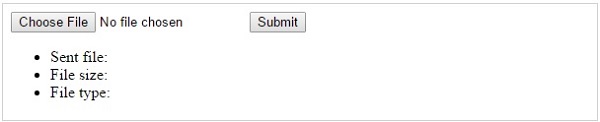
Below example should allow upload images and gives back result as uploaded file information.
<?php
   if(isset($_FILES['image'])){
      $errors= array();
      $file_name = $_FILES['image']['name'];
      $file_size = $_FILES['image']['size'];
      $file_tmp = $_FILES['image']['tmp_name'];
      $file_type = $_FILES['image']['type'];
      $file_ext=strtolower(end(explode('.',$_FILES['image']['name'])));
      
      $extensions= array("jpeg","jpg","png");
      
      if(in_array($file_ext,$extensions)=== false){
         $errors[]="extension not allowed, please choose a JPEG or PNG file.";
      }
      
      if($file_size > 2097152) {
         $errors[]='File size must be excately 2 MB';
      }
      
      if(empty($errors)==true) {
         move_uploaded_file($file_tmp,"images/".$file_name);
         echo "Success";
      }else{
         print_r($errors);
      }
   }
?>
<html>
   <body>
      
      <form action = "" method = "POST" enctype = "multipart/form-data">
         <input type = "file" name = "image" />
         <input type = "submit"/>
   
         <ul>
            <li>Sent file: <?php echo $_FILES['image']['name'];  ?>
            <li>File size: <?php echo $_FILES['image']['size'];  ?>
            <li>File type: <?php echo $_FILES['image']['type'] ?>
         </ul>
   
      </form>
      
   </body>
</html>
It will produce the following result −
Upload Script